In 2026, Laravel is the most productive PHP framework for building a SaaS platform — with first-party tooling for every layer of the stack, from authentication and queuing to serverless deployment. But tooling is not the hard part. The hard part is making the right architectural decisions in the right sequence. This step-by-step guide covers every layer of a production-ready Laravel SaaS: database strategy, team management, billing, feature flags, admin operations, real-time infrastructure, and deployment — with the technical depth actually to build one, not just to plan it.
Before You Write Code: Define Your SaaS Boundaries
The most common and costly mistake SaaS founders make is starting to code before
answering four foundational questions:
• Who is the customer unit? An individual user, or an organisation/workspace?
• Does your product need team collaboration? Multiple users, roles, and invitations?
• How is billing structured? Per workspace, per seat, or per usage?
• How strict does tenant data isolation need to be? Startup-level or enterprise/HIPAA-level?
These four decisions cascade into every downstream choice: your database schema, your routing strategy, your auth model, and your billing integration. The recommended default for most B2B SaaS products is to model your account as a workspace or team, then attach users and roles to that workspace. Build this model first. Everything else attaches to it.
Section 1: Multi-Tenancy Architecture
Multi-tenancy allows a single installation of your codebase to serve thousands of independent customers. There are three strategies, and choosing the wrong one at the MVP stage costs you a painful migration at scale.
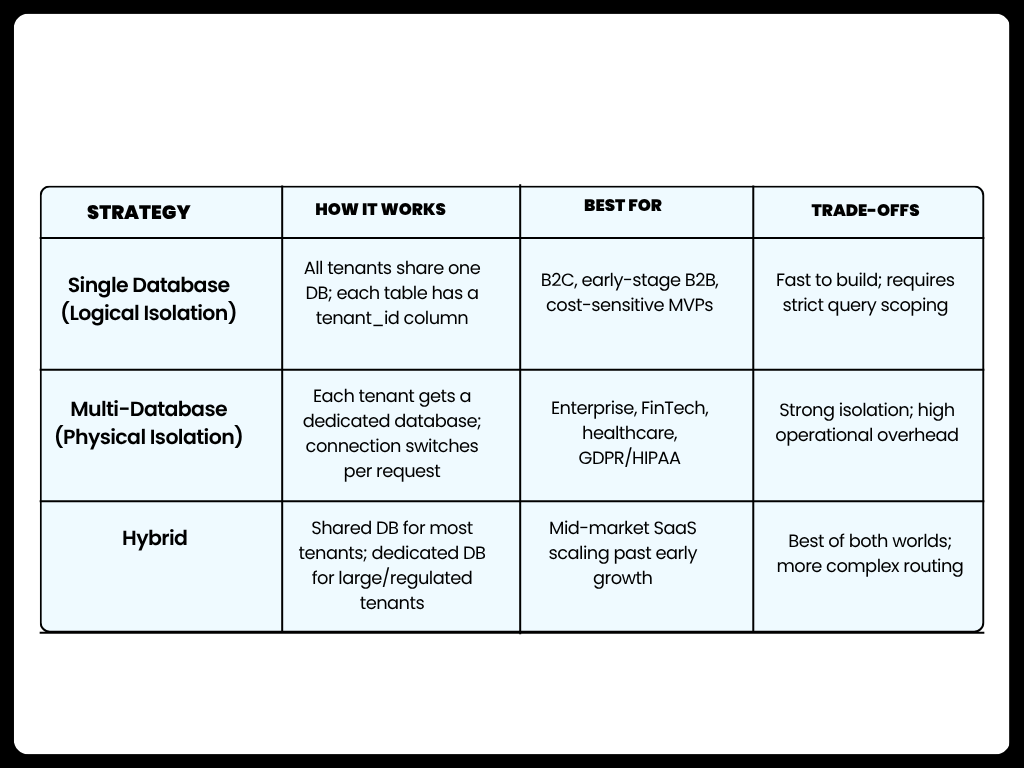
The rule for 2026: Start with a single database for your MVP. Move to a hybrid or multi-database setup only when a specific enterprise client demands it, compliance requirements mandate it, or a large tenant is degrading performance for others.
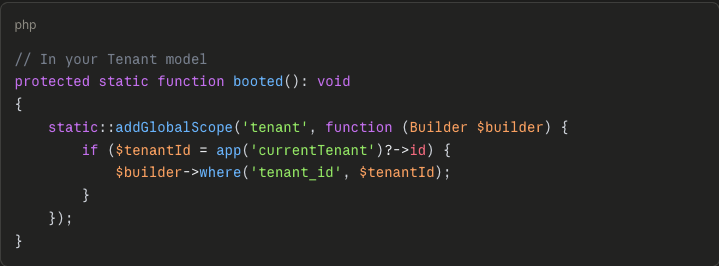
Implementing Single-Database Tenancy with Global Scopes
Section 2: Modeling Core Entities
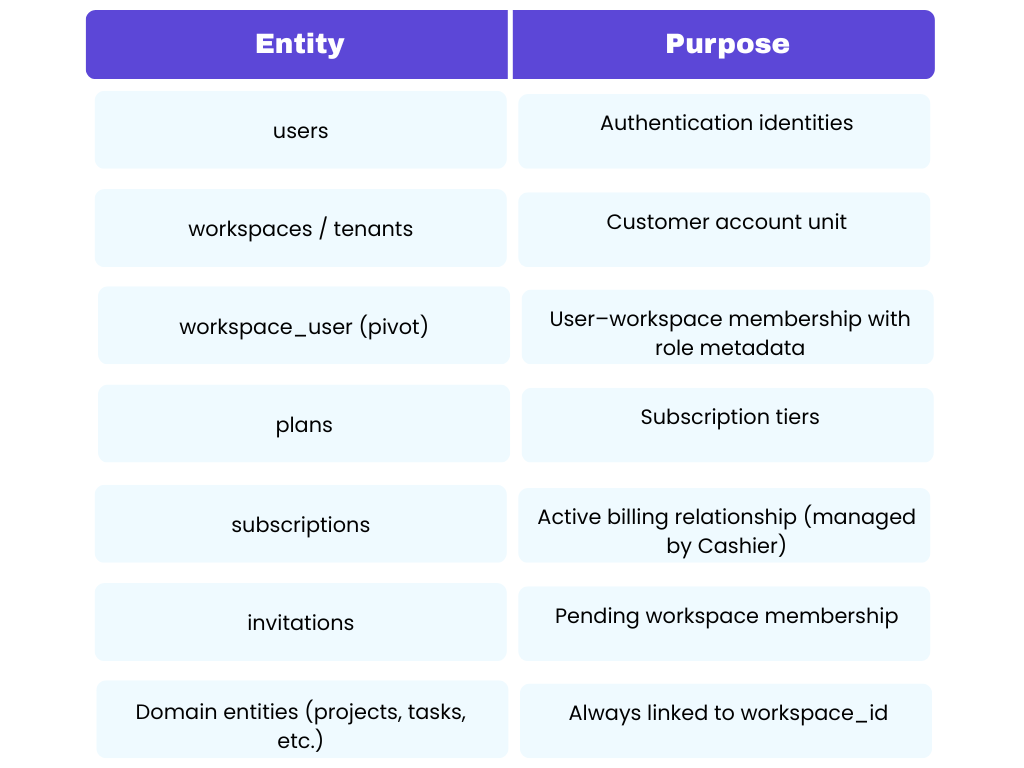
Once you have chosen your tenancy strategy, define your domain model before building features. At a minimum, every Laravel SaaS needs these entities:
Section 3: The 2026 Tech Stack — The Modern Monolith
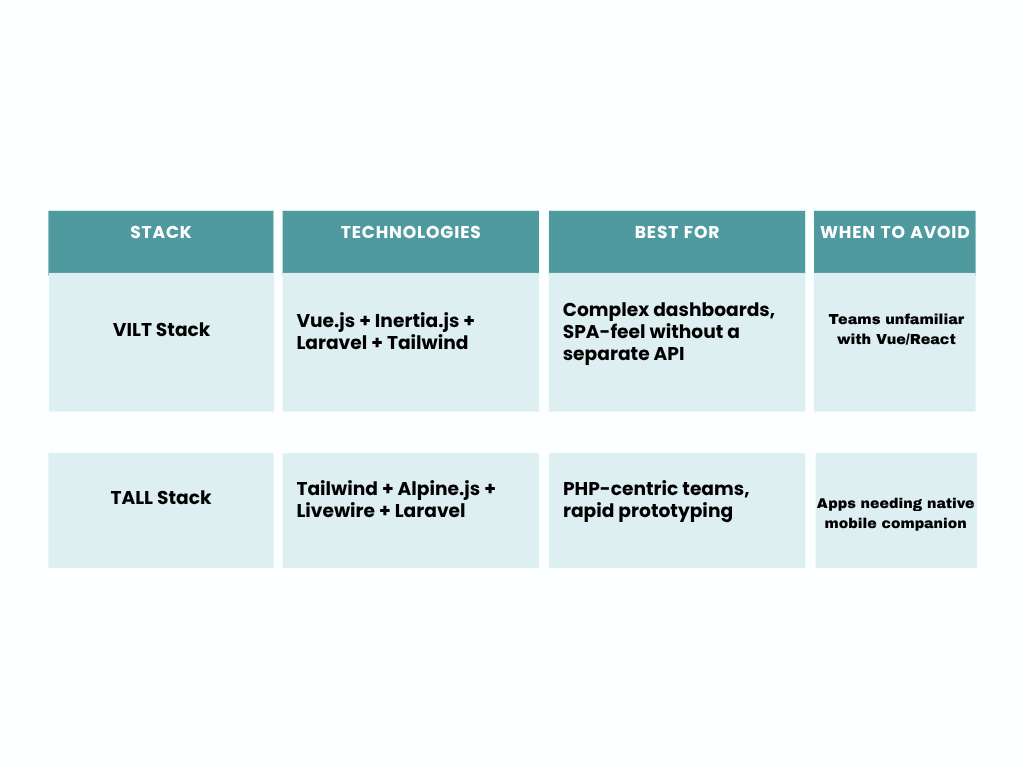
Inertia.js + Vue.js is the current gold standard for high-end SaaS dashboards. Livewire 4 is now fast enough that most users cannot distinguish it from a JavaScript framework — choose it if you want to stay in the PHP ecosystem.
Section 4: Authentication and Team Management
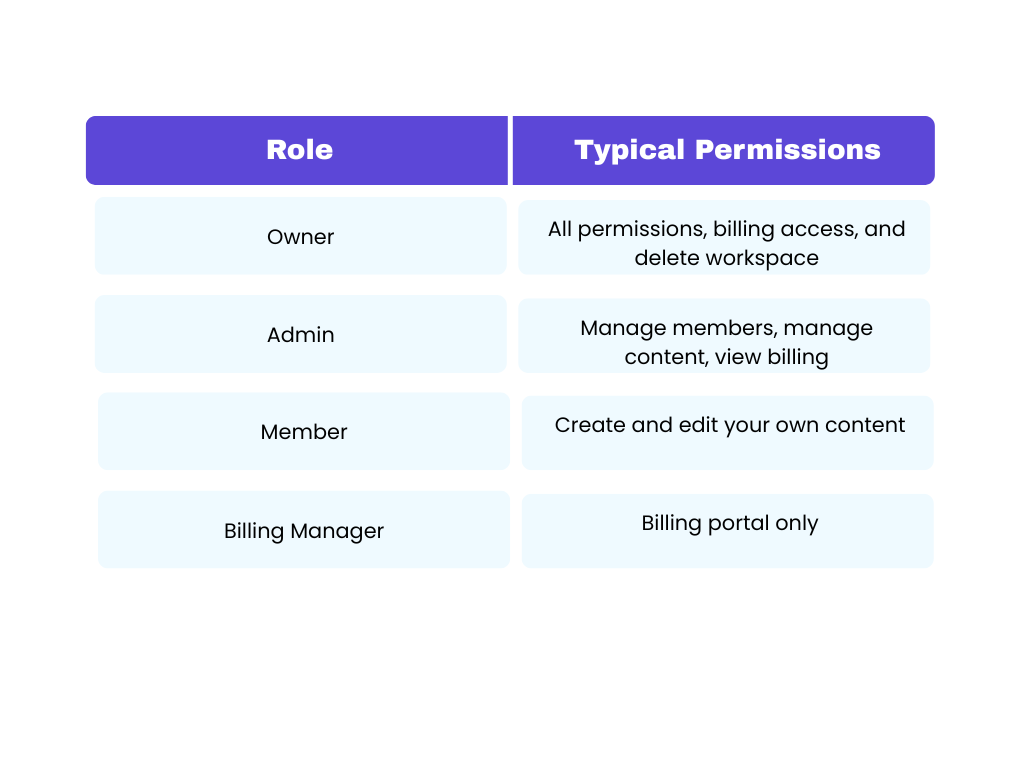
Build the full auth lifecycle early — registration, login, 2FA, email verification, password reset, and optional social login (GitHub/Google). Retrofitting it post-launch is expensive and risky. Laravel Jetstream provides team switching, Sanctum API tokens, and 2FA out of the box.
Section 5: Onboarding Flows and Tenant Provisioning
Good onboarding architecture reduces early churn. Build five milestones:
1 = Workspace creation — triggered immediately after registration
2 = First-value moment — the action that proves the product works
3 = Invite teammate flow — drives seat expansion and switching costs
4 = Trial activation — gate trial starts after workspace setup, not registration
5 = Starter data — optional demo content so new workspaces do not land on an empty screen
Use Laravel's event system to trigger onboarding steps rather than embedding logic in controllers.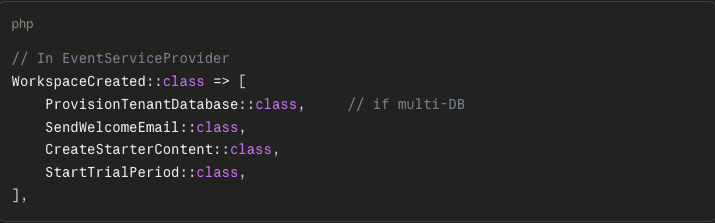
Section 6: Building the Revenue Engine — Billing and Subscriptions
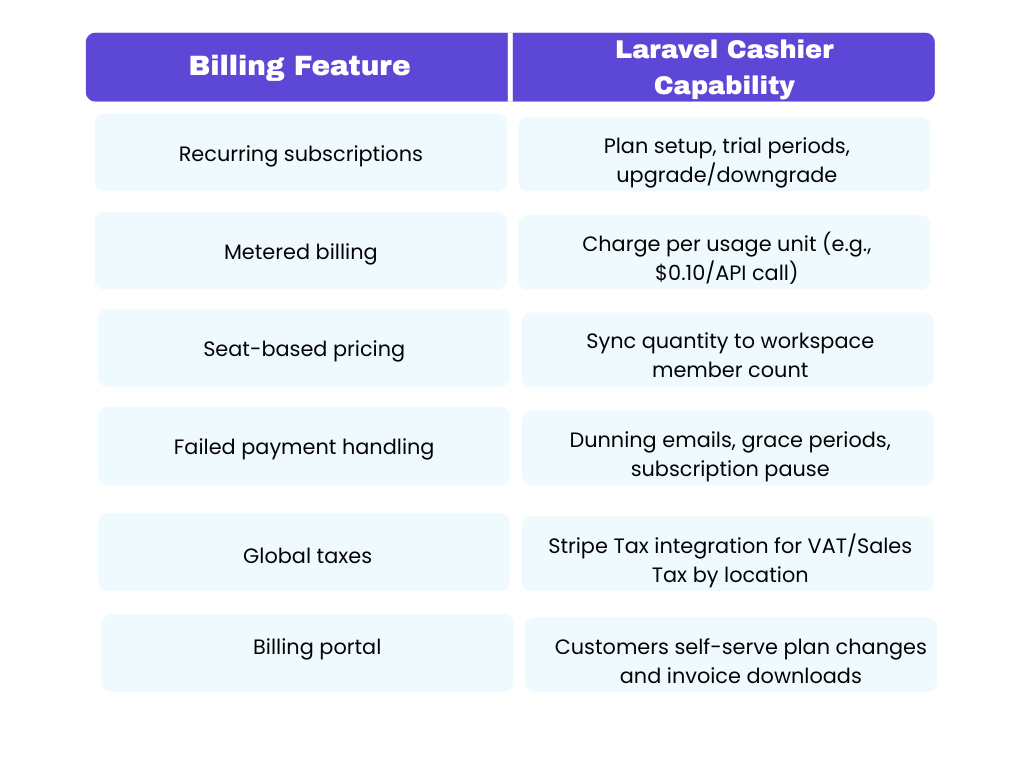
In 2026, billing is far more complex than charging a card. You're dealing with metered usage, global tax compliance, seat-based pricing, dunning flows, and webhook event handling.
Laravel Cashier (Stripe or Paddle)
Cashier provides an expressive interface to Stripe's and Paddle's subscription APIs.
Handling Stripe Webhooks
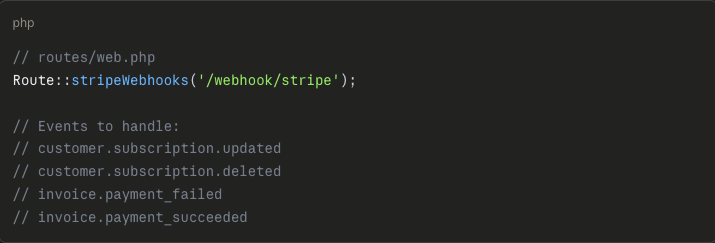
Webhooks are where most billing implementations break in production. Register a dedicated webhook endpoint and handle at minimum these events:
Laravel Spark
If you want to skip building the billing UI entirely, Laravel Spark is a commercial plug-and-play billing portal. It handles subscription management, plan switching, payment method updates, and PDF invoice generation with a polished UI that takes weeks to build from scratch.
Section 7: Feature Flagging with Laravel Pennant
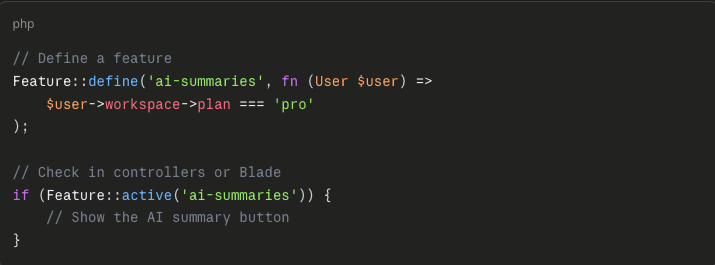
This is one of the most overlooked tools in the Laravel SaaS ecosystem in 2026. Laravel Pennant lets you control which features are available to which tenants — without deploying separate code branches.
Use cases:
1 = Gate premium features to paid-plan tenants only
2 = Run A/B tests on onboarding flows
3 = Roll out new features to beta tenants before general availability
4 = Instantly disable a feature for a specific tenant without a code deployment
Section 8: Admin Panel — Your Internal Operations Dashboard
Every production SaaS needs an internal admin panel for support, operations, and monitoring. This is not optional. You cannot operate a real SaaS product without visibility into tenant state, billing status, and account issues.
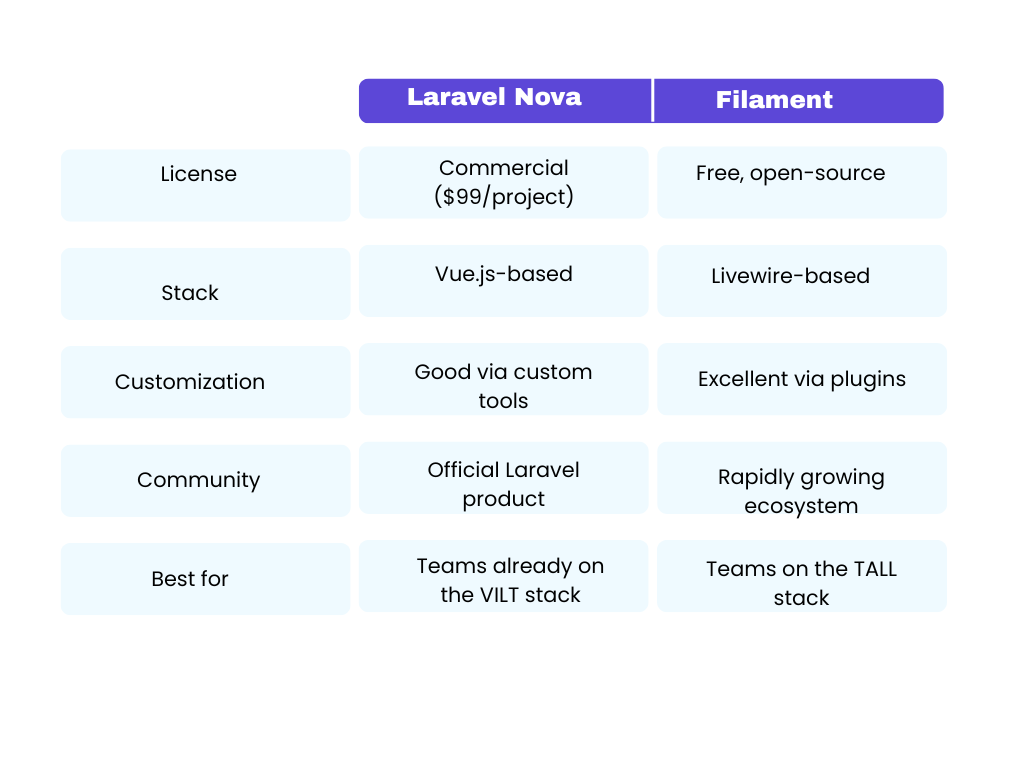
Laravel Nova vs. Filament
At minimum, your admin panel should expose: workspace/user lookup, subscription state visibility, failed billing monitoring, and invite/account diagnostics.
Section 9: Backend Infrastructure — Queues, Real-Time, and Performance
Laravel Queues and Horizon
Never make a user wait for background work. Email sending, report generation, PDF creation, and webhook dispatching all belong in queues.
Use Redis as your queue driver for high-throughput workloadsUse Laravel Horizon for a real-time dashboard showing queue throughput, wait times, and job failures
Always configure separate queues per priority:
critical,default,lowLaravel Reverb — First-Party WebSockets
Previously, real-time features required Pusher (a paid third-party service). Laravel Reverb, released as a first-party package, lets you run a WebSocket server on your own infrastructure and handle thousands of concurrent connections.Use cases: live notifications, collaborative editing presence, and real-time dashboard updates.

Laravel Octane — Sub-Millisecond Response Times
Octane keeps your Laravel application in memory using Swoole or RoadRunner, eliminating the framework bootstrap overhead on every request. This allows your SaaS to handle large traffic spikes with consistently low latency — under 1ms for cached routes.
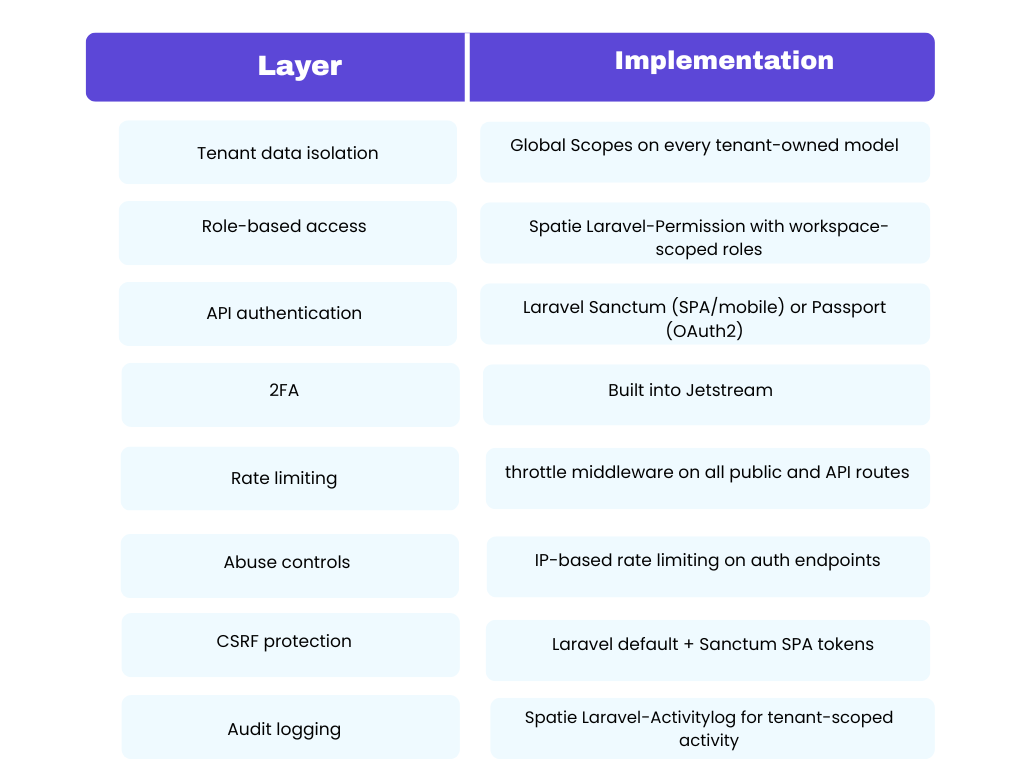
Section 10: Security — Not an Afterthought, a Feature
.
The most dangerous bug in a multi-tenant SaaS is a missingtenant_idscope on a query. Enforce it in modelbooted()hooks, not in controllers — controllers are too easy to forget.
Section 11: Scaling and Deployment
Laravel Vapor — Serverless on AWS Lambda
For "hands-off" auto-scaling, Laravel Vapor deploys your application as AWS Lambda serverless functions. It scales from 1 to 1,000+ concurrent requests in seconds, and deployments are atomic — no downtime during code releases.
Traditional VPS + Octane
For teams not ready for serverless, a well-tuned VPS with Laravel Octane, Redis, and a CDN for static assets can cost-effectively serve hundreds of thousands of monthly users.
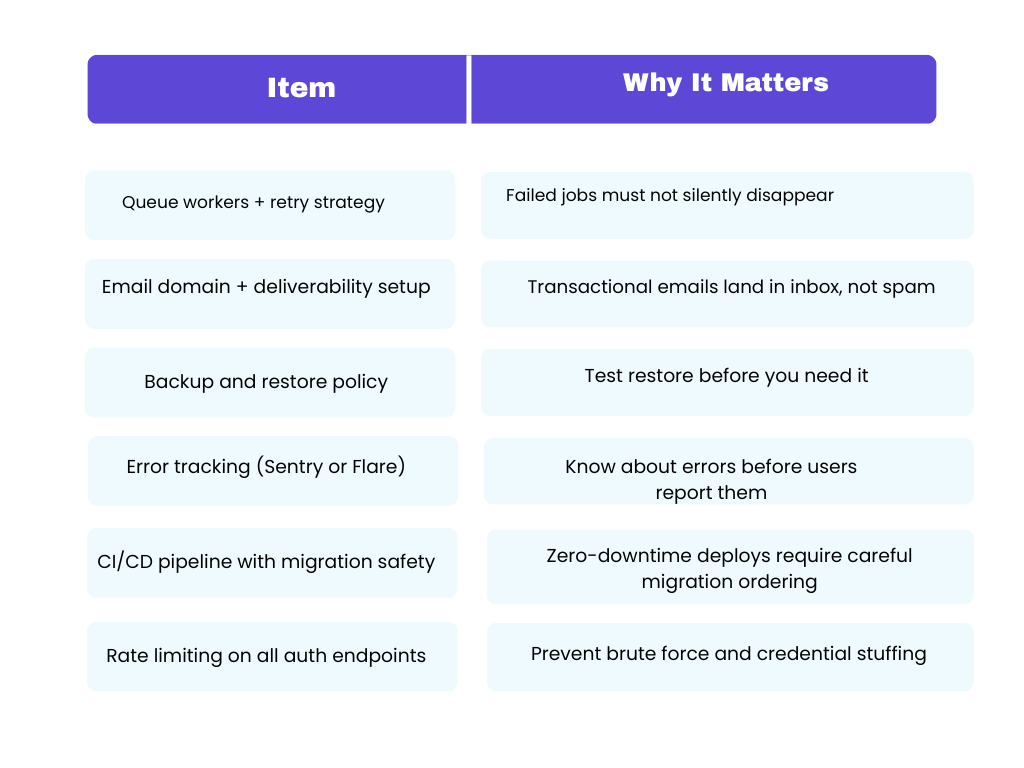
Deployment Checklist Before Launch
Section 12: Testing a Multi-Tenant Laravel SaaS
Testing is skipped in most Laravel SaaS guides and almost always causes production incidents. For multi-tenant apps, you need an additional layer of tests beyond standard feature tests.
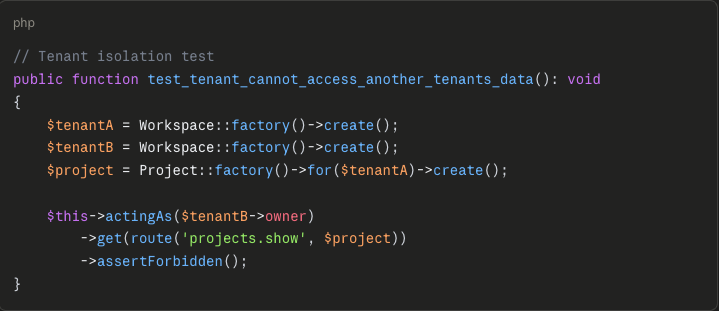
Write at least one isolation test per major resource type. This gives you a regression net as your codebase grows.
Starter Kits: Should You Build From Scratch?
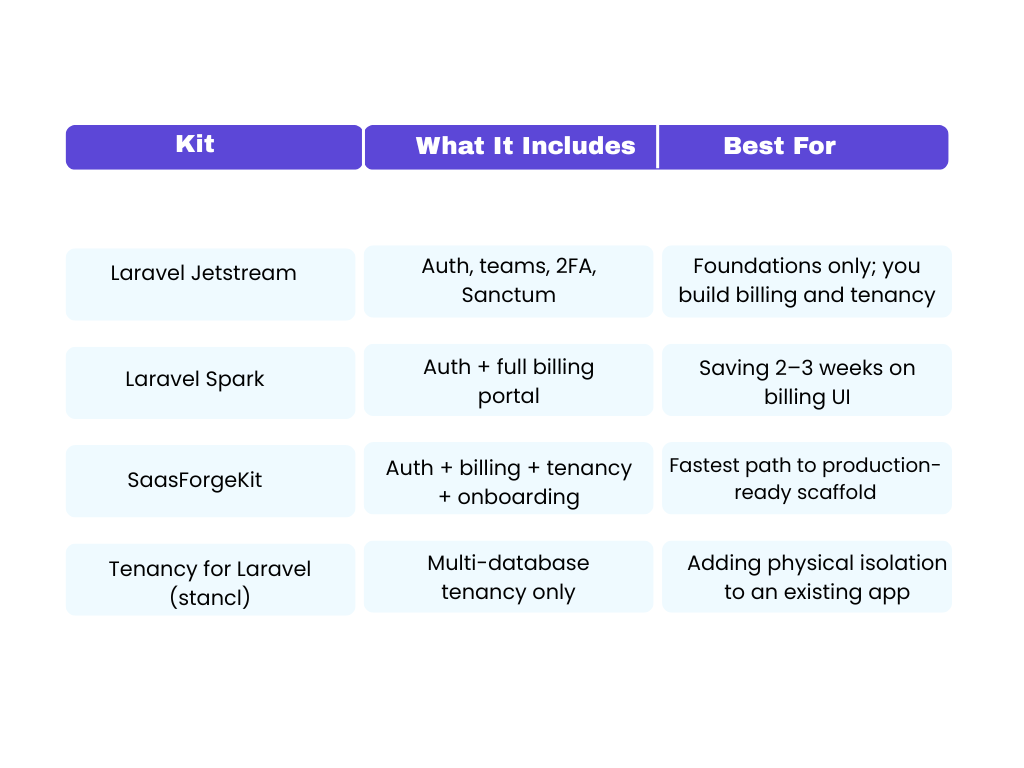
If you're building your first SaaS, a starter kit saves 4–8 weeks of boilerplate. If you're building your third, you probably have your own scaffold.
Frequently Asked Questions
Is Laravel fast enough for a global SaaS? Yes. With Laravel Octane and a well-tuned Redis cache, Laravel competes with Go and Node.js on requests per second while offering a dramatically better developer experience.
Single-database or multi-database tenancy — which should I start with? Start with a single database. It's faster to build and easier to operate. Move to multi-database when enterprise clients demand it, compliance requires it, or a large tenant is degrading performance for others.
Do I need to build my own billing system? No. Billing is legally and technically complex. Use Laravel Cashier with Stripe or Paddle. Never build payment logic from scratch.
When do I need Laravel Pennant? As soon as you have more than one pricing tier. Feature flags prevent you from deploying separate code branches per plan and let you control rollouts without code deploys.
What's the difference between Laravel Nova and Filament? Nova is a commercial, official Laravel product. Filament is free and open-source with a rapidly growing plugin ecosystem. Both are production-quality. Choose based on your stack (VILT vs TALL) and budget.
How do I handle failed Stripe payments? Laravel Cashier handles dunning automatically — it sends payment failure emails and supports grace periods. Configure CASHIER_PAYMENT_FAILURE_GRACE_DAYS in your environment to give users time to update their card before subscription suspension.
Should I use Laravel Vapor or a traditional VPS? Vapor is ideal if you expect unpredictable traffic spikes or want zero infrastructure maintenance. A traditional VPS with Octane is more cost-effective for predictable workloads and gives you more control.
What's the recommended release sequence? Internal alpha with seed tenants → private beta with Stripe test mode → controlled production release with monitoring in place before opening public sign-ups.
Final Thoughts
Building a SaaS platform with Laravel is one of the most rewarding technical investments you can make in 2026 — the ecosystem is mature, the tooling is first-party, and the developer experience is unmatched in the PHP world. But the architecture decisions you make in the first few weeks determine whether you are refactoring at month six or scaling confidently past it.
If you want to see these principles in action through real products built on Laravel, two worth looking at are Worksuite — a self-hosted HR, CRM, and project management platform with a SaaS edition — and TableTrack, a restaurant POS and table management SaaS built for simplicity and speed. Both are live examples of what a well-structured Laravel SaaS looks like in production, and both handle the exact multi-tenancy, billing, and subscription patterns covered in this guide.
Use this guide as your blueprint, build the foundations in the right order, and let tools like these show you the standard worth building toward.