Kitchen Order Ticket (KOT) System:
What It Is and Why Every Restaurant Needs One
Friday evening. The place is full. Table seven orders the fish.
Somewhere between the notepad and the kitchen, things go sideways. Maybe the waiter got pulled aside on the
way. Maybe the handwriting was rushed. Maybe the chef read it fast and grabbed the wrong ticket. Whatever the
Reason: Table seven gets chicken. The fish sits under the lamp, going cold. The customer says something. The
The waiter apologises. Nobody leaves happy, and nobody can quite pinpoint where it fell apart.
This kind of thing happens in restaurants more often than owners like to admit. Not because the team is careless,
but because paper-based order systems were never built for the pace of a real service. They work fine when the
The restaurant is quiet. They start breaking down the moment three tables order at the same time; the kitchen is
behind, and someone has four things in their head and one on paper.
A KOT system — Kitchen Order Ticket system — is what replaces that chain of handoffs. This guide covers what it
is, how it works in a real kitchen, and why restaurants that make the move stop having the same conversations
about wrong orders week after week.
What is a Kitchen Order Ticket (KOT)?
Put simply, it is the record of what a customer ordered, and the thing that gets that information from the waiter to
the kitchen without passing through anyone's memory or handwriting along the way.
Every KOT carries the same core information: which table, what was ordered, how many of each item, any special
instructions, what time the order came in, and who took it. That is the full picture; the kitchen needs to prepare the
order correctly. Leave any of it out and someone has to guess or go back and ask — and both of those slow
everything down.
Older restaurants used paper KOTs written in triplicate. One copy went to the kitchen, one to the billing counter,
One stayed with the waiter. It worked when restaurants were smaller and slower. In most modern setups, the
moment a waiter confirms an order on the POS, a digital KOT generates automatically and appears on the kitchen
printer or screen within seconds. Same purpose, completely different speed.
What Goes on a KOT?
The fields on a KOT are not arbitrary. Each one is there because kitchens have learned the hard way what
happens when it is missing.
Table 1 — What Every KOT Should Include
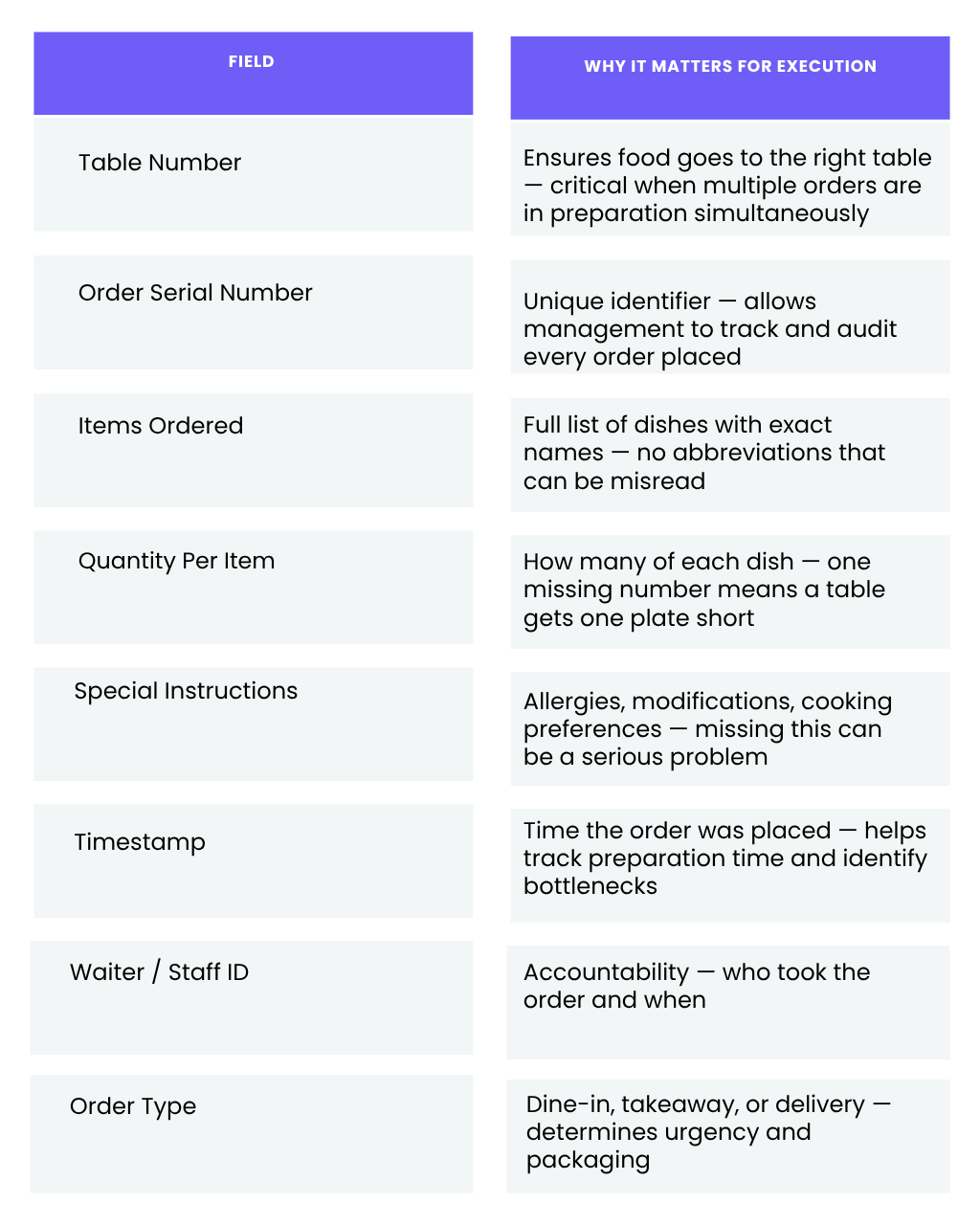
A ticket missing any of these fields puts the kitchen in the position of having to make a decision they should not
have to make — and under pressure, those decisions go wrong more often than anyone wants to admit.
How a KOT System Actually Works
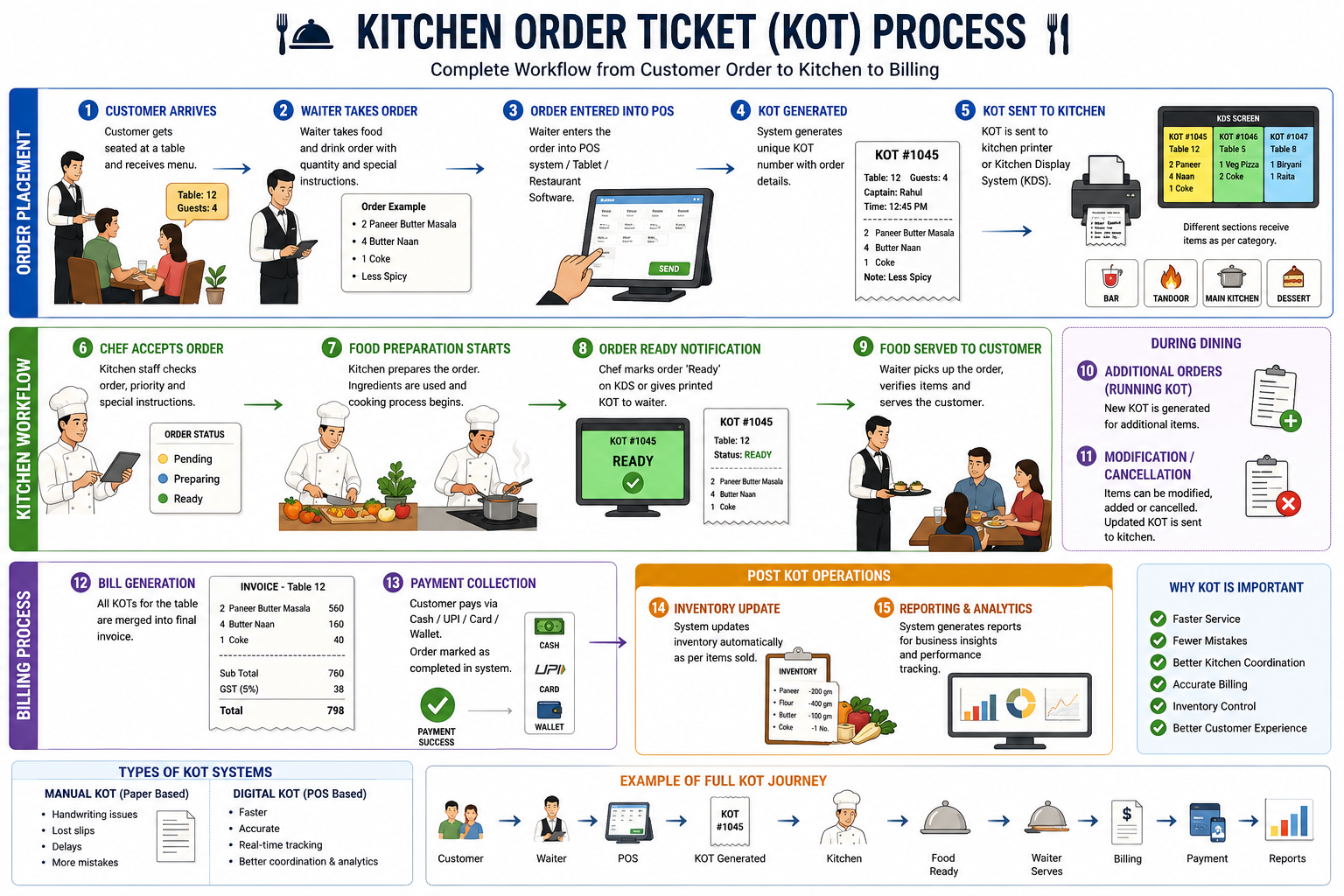
The waiter takes the order at the table, at the counter, or through a QR code that the customer scans themselves.
That order gets entered into the POS. The moment it is confirmed, the KOT generates automatically. Nobody
writes anything down. Nobody carries a slip across the floor. The ticket appears on the kitchen printer or display
screen within seconds, with every detail intact — table number, items, quantities, special instructions, time of order,
who took it.
The kitchen works from there. The chef reads the ticket, not a handwritten note passed through three hands.
Special instructions sit in the same font as everything else — not scrawled in a margin somewhere. If the
The restaurant has multiple stations; the relevant parts of the order route are automatically displayed on the right screen.
As the food gets prepared, the kitchen updates the ticket status. The waiter sees 'Ready' on their end and goes to
Collect the food. No walking to the pass to check. No shouting across a loud kitchen. The food reaches the table
hot, and the ticket closes when it is delivered.
That closed ticket does not disappear. It feeds directly into the billing system and into the day's order log. By the end of
service, the manager has a complete record of every order placed, when, by whom, and how long it took from
order to the table.
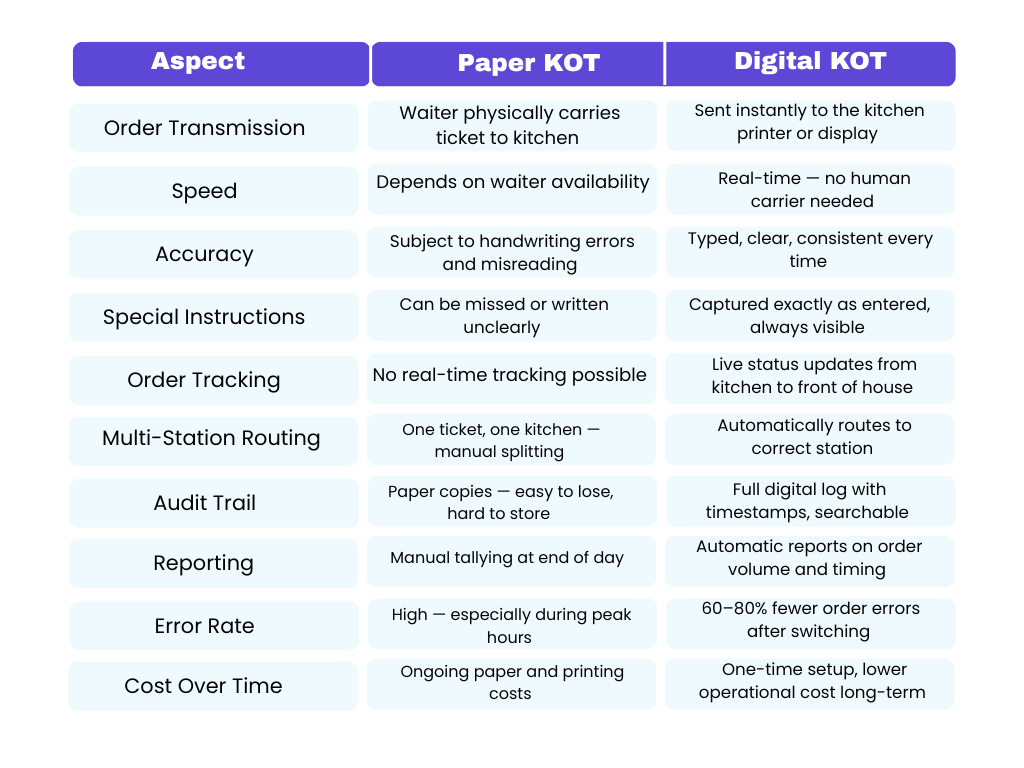
Paper KOT vs Digital KOT — What the Difference Looks Like in Practice
A lot of restaurant owners who are still on paper say the same thing: it works for us. And in a quiet cafe doing 30
covers on a weekday lunch, it probably does. The cracks show up at volume — when three tables order at the
same time, when the kitchen has twelve tickets on the go, when the waiter who took the order is now at the other
end of the floor.
Restaurants that make the move to digital KOT consistently report a 60 to 80 percent drop in order errors. For a
place doing 100 covers a day, even cutting a 5 percent error rate in half saves five wrong dishes per service — five
remakes, five wasted portions, five tables that waited longer than they should have.
Table 2 — Paper KOT vs Digital KOT
The Hidden Cost of Running on Paper Tickets
Most restaurant owners who haven't switched to a digital KOT system are not fully aware of what paper tickets are
costing them — because the costs don't appear in a single line item. They spread across multiple operational
failures that each feels like an isolated incident rather than symptoms of the same system problem.
Wrong orders sent back to the kitchen are the most visible cost. A dish has to be remade. Ingredients are wasted.
The table waits longer. But there are quieter costs that compound over time. Ticket loss during peak service is
common — a paper ticket knocked off a hot counter or buried under other tickets during a rush means that the order
simply does not get made.
Billing errors are another consistent problem. When the bill is manually compiled from KOT copies, items get
missed or duplicated. If undercharged, the restaurant loses revenue silently. If overcharged, the customer notices.
Peak hour breakdowns are the most costly — paper systems that work during quiet service collapse under
pressure when orders stack up, and verbal communication becomes impossible in a loud, busy kitchen.
Why Restaurants That Switch Don't Go Back
Ask any restaurant owner who moved from paper tickets to a digital KOT system what the most noticeable change
was, and most of them say the same thing: the kitchen got quieter. Not because there was less happening —
because there was less shouting.
1. The gap between order and kitchen shrinks to almost nothing
Think about how long an order currently takes to travel from a waiter's notepad to the chef's hands. On a slow
Tuesday, that's maybe 90 seconds. On a Saturday at 8 pm, it can be five minutes, and those are five minutes the
The kitchen is not cooking. When the order is punched into the POS, a digital KOT sends it to the kitchen before the
The waiter has turned around. That time saving, multiplied across every order and every service, adds up significantly.
faster table turnaround.
2. "No nuts" actually makes it to the kitchen
There is a specific kind of panic that happens when a customer flags down a waiter mid-meal to say their dish
contains something they specifically said they couldn't eat. It happens because a special instruction was written in
small letters at the bottom of a paper ticket, and a chef working fast didn't catch it. On a digital KOT, special
Instructions sit in their own field, in the same size and format as everything else. For dietary requirements and
allergies, this stops being about convenience and starts being about safety.
3. The right order goes to the right station without anyone directing traffic
Restaurants with more than one kitchen section spend a surprising amount of time just moving information around.
A digital KOT routes items to the correct station the moment the order is confirmed. The burger goes to the grill
screen. The salad goes to the cold section. The cocktails go to the bar. Nobody had to make a decision, carry a piece
of paper, or shout across the kitchen. It just routes automatically, consistently, every time.
4. Waiting staff, stop making pointless trips to the kitchen
Status updates from the kitchen screen to the front of house put an end to the loop of waiters walking to the pass to check.
Check if the food is ready. The waiter knows the food is ready because the system told them – not because they
walked to the kitchen to find out. That sounds like a small thing until you count how many trips per service it
eliminates.
5. The bill is right because the system kept track
A digital KOT feeds every item ordered directly into the billing system as it is placed. By the time the customer asks
For the bill, the system has a complete, accurate record. The bill is correct. Not mostly correct. Correct.
6. When something goes wrong, you can actually find out what happened
A digital KOT creates a record of every order the moment it is placed – what was ordered, who took it, when it hit
the kitchen, when it was marked ready, and when it was served. Over time, it is how managers spot patterns: a station
that consistently runs slow, a menu item that gets modified more than any other, a service period where errors
cluster. You cannot improve what you cannot see – and paper tickets show you almost nothing.
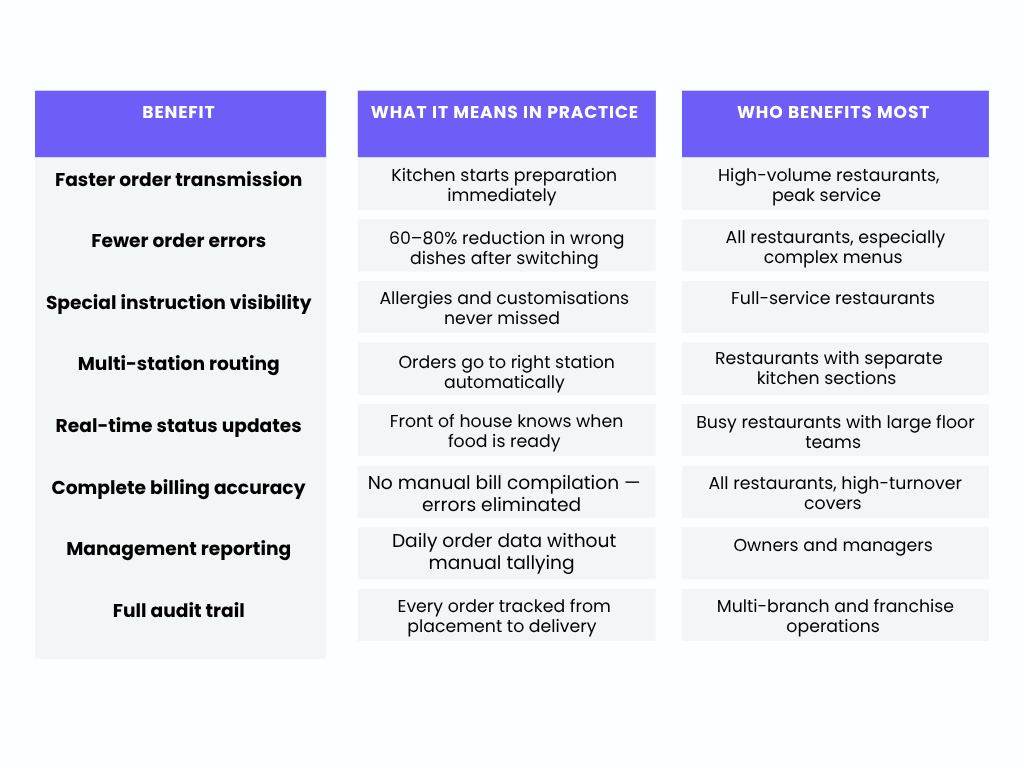
Table 3 — KOT System Benefits at a Glance
Do Small Restaurants Need a KOT System?
This is the question most independent restaurant owners ask — and the honest answer is that the size of the
restaurant changes how urgently a KOT system is needed, but it does not change whether it is needed at all.
A 20-cover neighbourhood cafe might feel like it manages fine on paper tickets during quiet service. But even at
that scale, every wrong order, every missed special instruction, and every billing error is a percentage of the day's
revenue lost. And the moment that cafe has a busy Saturday evening or starts handling takeaway orders alongside
dine-in, the paper system starts showing its limits.
Nearly 75% of all restaurant traffic now occurs off-premises, driven by takeout, delivery, drive-through, kiosks, and
QR code ordering. Most modern restaurants are handling multiple simultaneous order channels, whether they
planned to or not. A digital KOT system is what makes managing all of those channels from a single kitchen
operationally possible.
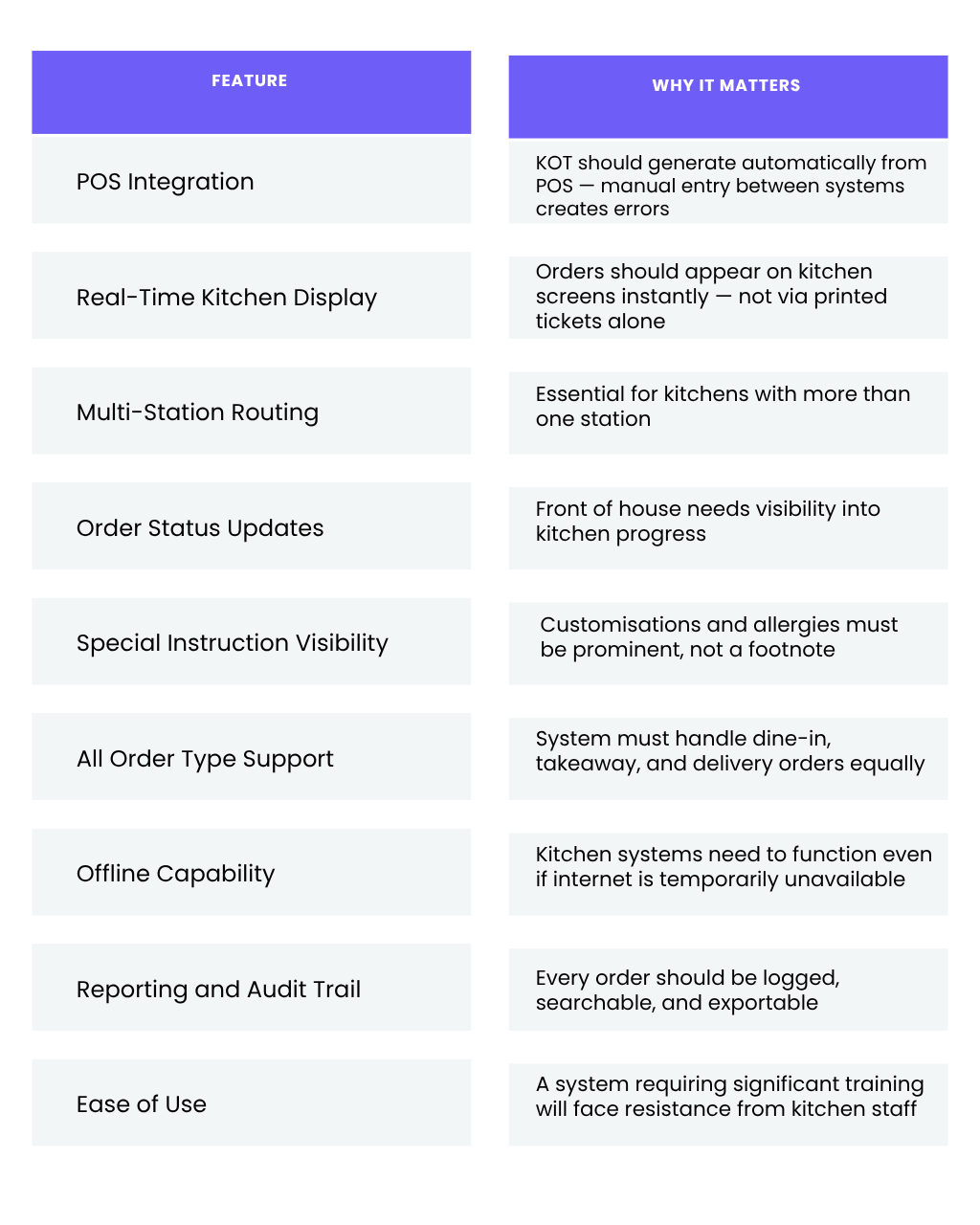
What to Look for in a KOT System
Not all KOT systems are built the same. Before choosing one, evaluate these core capabilities.
Table 4 — What to Evaluate Before Buying
How TableTrack Handles KOT
Most restaurants that come to TableTrack have the same story — they were managing on paper, or on a system
where the KOT was an afterthought bolted onto the side of a billing tool. Neither worked the way a busy kitchen
actually needs it to work.
TableTrack's KOT is built into the core of the platform, not added on top of it. When a waiter punches an order into
The POS, the ticket goes to the kitchen immediately — printer or screen, depending on how the kitchen is set up.
Special instructions are front and centre on every ticket. For restaurants with more than one kitchen section, orders
split and routed to the right station without anyone having to decide where things go.
The front of house sees status updates. The kitchen sees the queue. The manager sees the full order log at the
end of service without having to manually compile anything. The whole thing sits inside a single platform — table
management, menu, payments, staff roles, reporting — so the KOT is not a separate tool to manage. It is just how
the restaurant runs.
KOT and Kitchen Display System (KDS) — Understanding the Difference
These two terms often get used interchangeably, and they are not the same thing. A KOT is the order ticket itself —
The document containing the order details. A Kitchen Display System is the screen in the kitchen that displays
those tickets digitally. One is the content. The other is the method of delivery.
In a digital KOT setup, the KDS replaces the kitchen printer — instead of printing tickets on paper, it appears on
the screen. Some restaurants use both — a KDS for the main kitchen stations and a printer for specific sections
that prefer a physical ticket. Both approaches are valid. What matters is that the KOT system driving them is
reliable, integrated with the POS, and captures every order correctly.
Where Restaurants Go Wrong When Switching to KOT
The switch to digital KOT is straightforward. Where restaurants run into trouble is almost always in how they make
the transition, not in the technology itself.
The kitchen team needs to see it before service, not during it. Staff who have worked on paper tickets for years
have a muscle memory around how orders arrive. Two or three trial runs during a quiet period before going fully
live make the difference between a smooth transition and a chaotic one.
Special instructions only work if waiters actually enter them. A digital KOT is only as accurate as what goes into the
POS. This is a training habit, not a technology problem — and it is worth being explicit about from day one.
The integration point matters more than most people realise. Some restaurants end up with a KOT system that is
separate from their POS, which means orders get entered twice. That duplication is exactly the kind of manual
handoff that creates errors.
Questions Restaurant Owners Ask About KOT Systems
Is a KOT the same as the bill?
No, and the confusion is common. The KOT is an internal document. It goes to the kitchen and tells the chef
what to make. The bill is what the customer sees at the end of the meal. In a properly connected system, the KOT
feeds into the bill automatically — every item ordered appears on the bill without anyone having to manually
compile it.
We do takeaway and delivery as well as dine-in. Can one KOT system manage all three?
Yes, and this is actually one of the strongest arguments for going digital. A digital KOT labels every ticket with its
order type — dine-in, takeaway, delivery — and the kitchen team always knows what they are preparing and how it
needs to go out. When all three channels are running simultaneously, that clarity is what keeps the kitchen from
collapsing under the volume.
What happens if the internet drops mid-service?
It depends on the system, and this is worth asking about before you commit to any restaurant software. Good
platforms include offline functionality — orders can still be placed, and KOTs can still be generated without an internet connection
active connection, syncing everything once the internet comes back.
We only have one kitchen station. Is a KOT system still worth it for us?
The routing and multi-station features matter less at that scale — but the accuracy, the billing integration, and the
order log still do. A single-station kitchen running digital KOT stops losing revenue to billing errors and wrong
orders. For most small restaurants, those two things alone justify the switch.
One Honest Question Worth Asking Your Team Today
Before looking at any software, ask your kitchen team one question: how many times last week did an order go
wrong, and where exactly did the breakdown happen?
Most restaurants that ask this question honestly get a version of the same answer. The food was fine. The cooking
was fine. Something in the communication between the front of house and the kitchen broke down. A ticket got
lost. An instruction was missed. An order went to the wrong station. The waiter and the chef had two different ideas
of what was actually ordered.
Those breakdowns are not random. They are what a paper-based order system produces under pressure,
consistently, across every service. The kitchen is not failing — the communication system between the floor and
the kitchen is. A digital KOT closes that gap. The kitchen gets quieter. Not because there is less happening —
because there is less to shout about.