Let's be honest — picking project management software used to feel straightforward. You tried
a few tools, picked one that made sense for your team, and got on with work.
But somewhere along the way, that changed. Now every tool has a pricing page with four tiers,
a "per user per month" model that quietly doubles your bill as the team grows, and a data policy
that lives on someone else's server in a country you have never thought about.
A lot of teams are quietly asking whether the SaaS subscription model still makes sense for
And honestly — for many, it does not.
That is where self-hosted project management comes in. You put the software on your own
Your data stays with you. You pay once. And yes, it is less scary to set up than it sounds
— we will get into that.
This guide walks through how the two models actually compare in 2026 and how each one works
for, and what to consider before committing either way.
What does 'self-hosted' actually mean?
Self-hosted software is an application you install on your own server. That could be a VPS you
rent from DigitalOcean or Hostinger, a private cloud environment, or even hardware sitting in
your office. The key point is that the database, the files, and all the data generated by your team
live on infrastructure you control — not the vendor's.
With SaaS, the vendor handles everything on their end. You get a login URL. It is convenient.
But you are renting access rather than owning anything. If prices change, if the company gets
acquired, or if they decide to sunset the product — that is their call, not yours.
The cost gap is bigger than most people realise
Most people underestimate how much they actually spend on SaaS project tools over time. So
Let us run real numbers.
Take a 15-person agency using a mid-range SaaS project tool at $15 per user per month. That
is $225 monthly, or $2,700 per year. Across three years — a pretty normal window for a growing
team — you are looking at $8,100 at minimum. And that assumes zero price increases, which
never actually happens. Salesforce bumped major plan prices by 6% in August 2025 alone.
Now flip to the self-hosted side. Worksuite costs $30 once on CodeCanyon. Hosting on a basic
VPS runs $5–10 per month. Three-year total? Under $400. Same team size, same features —
including the HR and CRM modules that most SaaS tools charge extra for.
According to Zylo's 2025 SaaS Management Index, the average company spends around
$4,830 per employee per year on software across all subscriptions. Project management is
rarely the only tool in the stack, and the costs add up fast. At a certain point, consolidating into a
self-hosted all-in-one stops being a technical decision and starts being a financial one.
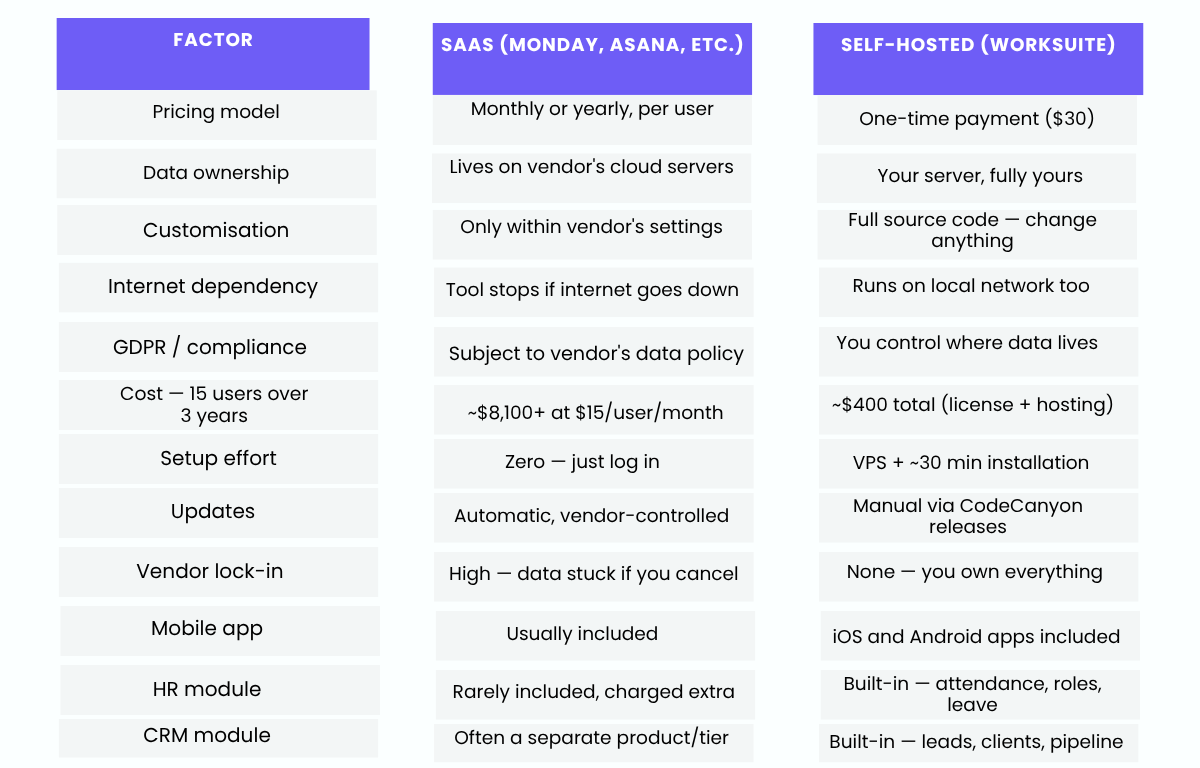
Comparing the two models side by side
Here is a straight breakdown across the factors that tend to matter most when choosing a long-term tool.
Where self-hosted genuinely wins
You control the data — completely
Data ownership sounds abstract until something goes wrong. A vendor gets breached, changes
their data sharing policy, or gets acquired by a company with different privacy standards. With
self-hosted software, none of that touches you — because the data never left your server.
This has become a much bigger deal in 2026. Gartner forecasts that 60% of enterprises will
require greater data residency control for critical systems by end of 2027 — and that pressure is
already filtering into smaller businesses through GDPR requirements and client security
questionnaires. If you work with clients in regulated industries, owning your data infrastructure
can actually be a selling point.
The cost stops scaling with headcount
Every time you hire someone in a SaaS model, your software bill goes up. That is just how per-
seat pricing works. With self-hosted, the software license cost is fixed. Bring on five new people
— the tool costs the same. For teams that expect to grow, this structural difference compounds
significantly over two to three years.
You get the actual code
With Worksuite's self-hosted license, you get the full unencrypted source code. If your dev team
needs to change how something works, add an integration, or adjust the UI to match your brand
— they can. You are not filing feature requests and hoping the vendor prioritises them. You just
build it.
No exit anxiety
One thing nobody talks about with SaaS tools is the anxiety of being trapped. What happens if
they shut down? What if the price doubles and you cannot export your data cleanly? With self-hosted, the software keeps running on your server regardless of what happens to the vendor.
You own the code. You own the data. There is no exit scenario to stress about.
When SaaS still makes more sense
To be fair — self-hosted is not the right answer for every team. Here are the situations where
SaaS probably wins:
• No technical resource at all. If no one on your team is comfortable SSHing into a
server or following a basic deployment guide, the setup hurdle is real. SaaS removes it
entirely.
• You need to be running within the hour. SaaS is genuinely faster to get started —
Sign up, invite the team, go. Self-hosted needs a server and a 30-minute setup process.
• You are a solo freelancer or a two-person team. At that scale, the cost difference
between a $10/month tool and a $30 one-time fee is not life-changing. The SaaS convenience
might be worth it.
• You have a specific ecosystem dependency. If your clients require you to use a
particular tool, or you need deep integrations with a specific SaaS stack, that may
outweigh the self-hosted advantages.
Outside these situations, self-hosted consistently wins on cost, control, and flexibility for teams
of five or more.
Why Worksuite specifically is worth considering
Most self-hosted project management tools do one thing well. They are either a project tracker,
or a CRM, or an HR system. Rarely all three together.
Worksuite is different in that it covers the whole stack in a single Laravel application. Projects,
tasks, and timelines. Client management and leads. HR — attendance, leave, employee
profiles. Finance — invoices, estimates, expense tracking. Support tickets. Time tracking tied
directly to billing. iOS and Android mobile apps.
For most small agencies or service businesses, that replaces what would otherwise be three or
four separate SaaS subscriptions. At $30 one-time, the value is difficult to find fault with.
The Laravel codebase is worth mentioning specifically because it is the most popular PHP
framework in active use. That means finding a developer to extend or maintain it is not a niche
skill — it is mainstream. And with 4,700+ sales and a 4.83 rating on CodeCanyon, there is a
track record here that most self-hosted tools in this category cannot match.
Questions that come up a lot
How hard is it actually to set up?
For anyone with basic server experience — not much. A standard installation on a VPS takes
roughly 30 minutes if you follow the documentation. Hostinger and DigitalOcean both have
Laravel-ready environments that cut setup time further. Worksuite's support team also assists
with the initial setup, so you are not doing it completely alone.
How do updates work?
Updates come through CodeCanyon. You get notified when a new version drops, download it,
and apply it manually. It is a bit more involved than automatic SaaS updates, but you also never
get surprised by a UI overhaul on a Monday morning because the vendor pushed a major
change overnight.
Can I modify Worksuite after buying?
Yes. The Regular License includes the full unencrypted code for use within your organisation.
Your team can modify features, adjust the design, and integrate with internal tools. The
restriction is that you cannot resell or redistribute the code — it is for your organisation's use
only.
How does it compare to Perfex CRM?
Perfex is one of the top-selling scripts on CodeCanyon and a solid tool for clients and projects
The main practical difference is that Worksuite includes a full HR module —
attendance tracking, employee management, leave management — which Perfex does not. If
You need both client management and internal HR in one place. Worksuite covers more ground.
Can remote teams use a self-hosted tool?
Yes. A VPS is accessible from anywhere over the internet by default — your team in different
cities or countries log in the same way they would with any SaaS tool. The mobile apps help
, too, for team members who are frequently away from a desk.